

Legal pages
Privacy policy, payment and delivery terms and legal guarantee — editing, hiding and the EU legal guarantee notice
Your store's legal pages are in the dashboard under Content Management → Legal pages. They are shown in the store footer, and they are created for your store automatically when the store is set up.
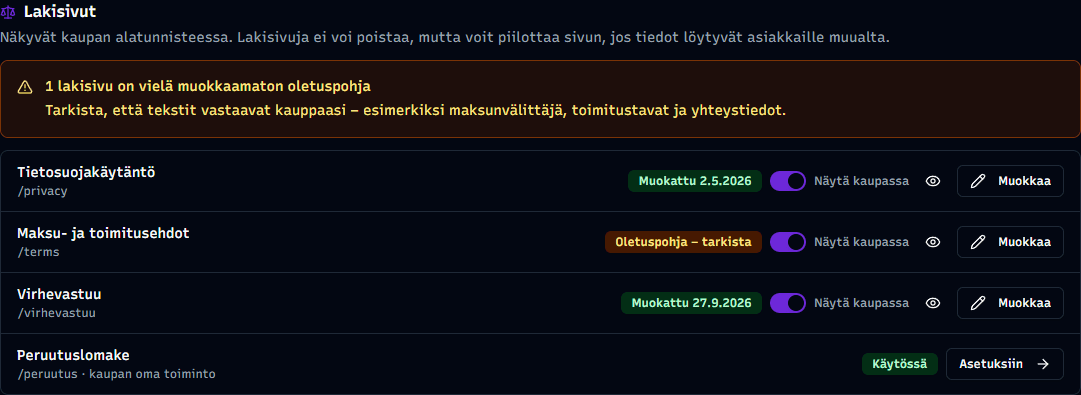
Which legal pages the store has
- Privacy policy (
/privacy) — how the store handles customers' personal data - Payment and delivery terms (
/terms) — payment methods, deliveries and returns - Legal guarantee (
/virhevastuu) — the EU harmonised notice on the consumer's legal guarantee
The section also shows the Withdrawal form, which customers use to withdraw from an order. It is not an editable page but a built-in store feature: the row shows whether it is Enabled or Disabled, and the Settings button takes you to Notification Settings, where the feature can be switched on or off.
Editing a legal page
Click Edit on the page's row. You can change the page title and content like any other page — see Editing content. Save with the Save page button.
Default template – review
The privacy policy and the payment and delivery terms get a ready-made template text when the store is created. As long as the text is unedited, the row shows Default template – review, and a reminder appears above the section.
The template is generic, so check that it matches your store — for example the payment provider, delivery methods and contact details. Once you edit the text and save the page, the badge changes to the edit date.
Hiding a legal page
Legal pages cannot be deleted, but each has a Show in store toggle. When you switch it off:
- the page is removed from the store footer
- the page's address no longer opens for customers
- the page and its text stay in the dashboard, and the row shows Hidden
You can bring the page back with the same toggle at any time. The change may take a few minutes to show in the store.
Only hide if the information is available elsewhere
Legal pages contain information that must be given to customers. Only hide a page if customers can find the same information elsewhere. The merchant is responsible for the content and visibility of the legal pages.
Legal guarantee and the EU legal guarantee notice
EU Regulation (EU) 2025/1960 requires merchants selling goods to consumers to display the EU harmonised notice on the legal guarantee from 27 September 2026. The notice tells customers that goods have a legal guarantee of at least two years and what they can do with faulty goods.
The Legal guarantee page has been created for your store, visible by default. It shows the European Commission's official notice and below it a link to the EU's Your Europe page (europa.eu/youreurope/virhevastuu), where the notice's QR code also leads.
The notice cannot be edited
The notice's text, colours and QR code are set by EU regulation, so it is shown as-is. In the editor the notice is a locked block: it has a lock icon instead of the trash icon, and no editable fields.
You can still:
- change the page title
- move the notice by dragging it
- add your own blocks above or below it, for example complaint instructions and contact details
Adding your own instructions
- Open Content Management → Legal pages and click Edit on the Legal guarantee row.
- Click Add block and choose, for example, Text content.
- Write your instructions and drag the block above or below the notice if you like.
- Save with the Save page button.
I only sell tickets or services
The legal guarantee notice applies to selling goods to consumers. If your store only sells tickets or services, for example, you can hide the Legal guarantee page with the Show in store toggle. If you are unsure whether the requirement applies to your store, check with the Finnish Competition and Consumer Authority.
Related topics
- Editing content — editing pages and blocks
- Text & content blocks — the Text content block for your own instructions